
If you’ve been on Facebook over the last couple of days, you’ve probably seen some version of this chain message going around: If you go into your ACCOUNT SETTINGS then to BLOCKING (on left side of screen), then in the BLOCKED USERS search bar type in “following me” without the quotes, you might be startled by who is following you. Unfortunately you have to block them 1 at a time, which is annoying. I had 20 in the list and knew none of them. I blocked all of them. You might share or copy/paste if you found this helpful.
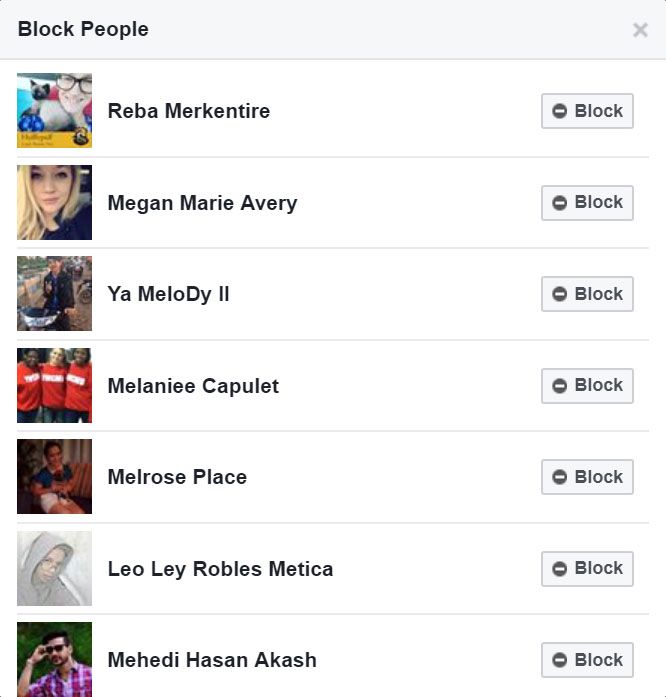
Like many things on Facebook, it’s totally false. Yes, if you input “following me” into the search bar you’d otherwise use to block people, a string of seemingly random people will come up. But unlike what the perpetrators of this hoax may want you to think, these accounts don’t belong to some secret network of spies — nor are they part of a grand conspiracy on the part of Facebook. Rather, they’re just the unfortunate victims of a misused search function.
Like many things on Facebook, it’s totally false. Yes, if you input “following me” into the search bar you’d otherwise use to block people, a string of seemingly random people will come up. But unlike what the perpetrators of this hoax may want you to think, these accounts don’t belong to some secret network of spies — nor are they part of a grand conspiracy on the part of Facebook. Rather, they’re just the unfortunate victims of a misused search function.
They definitely aren’t stalking you.Here’s why: When you search “following me,” Facebook doesn’t show you who is actually following you. (If you actually want to see that list, you have to click on the Followers section under your Friends List.) Searching this term on your Block page pulls up a list of users whose names and general information match the terms following and me as closely as possible. And though you see the names of all of the corresponding users, what you don’t see is all of the hidden and private information Facebook derives its matches from — like nicknames, “About Me” descriptions, and employment information. And that’s what the list is actually being generated from.
Unfortunately, however, everyone who’s fallen for the hoax is pulling up this list, and many of them are desperately contacting the people on it, demanding to know why they’re being followed. For the most part, the people who match these criteria are unfortunate randos — most of whom have their Facebook accounts locked down. But there’s another category of people who appear on the now-infamous list: fun-seeking trolls.

Unfortunately, however, everyone who’s fallen for the hoax is pulling up this list, and many of them are desperately contacting the people on it, demanding to know why they’re being followed. For the most part, the people who match these criteria are unfortunate randos — most of whom have their Facebook accounts locked down. But there’s another category of people who appear on the now-infamous list: fun-seeking trolls.
The messages never end when you’re on the List.Photo: Reba Merkentire“I saw the chain letter being posted on a few of the timelines of my friends yesterday morning,” Facebook user Melissa Freck explained to me. “I’ve blocked folks before, so I knew that typing ‘following me’ into the block-people list would show me nothing but random folks. So I decided to update my nickname to ‘following me’ to see if I would get a response.”
And, boy, did she get a response. Soon after changing her nickname, Freck’s inbox was flooded with thousands of messages from people asking who she was and why she was following them.
But Freck is far from the only person to try this. Facebook user Reba Merkentire did the same: “I’ve probably gotten over a hundred friend requests, and it’s really hard to keep up with the stuff, because a lot of people want to message you and be like ‘fuck you’ and then immediately block you afterward.”

However, the messages sent by Facebook’s most gullible are anything but routine. “The most absurd thing was a guy asking to see my boobs,” Freck told me. “I did have one person just spill their life story about losing two children. I felt I needed to respond to them whether it be true or not, because they seemed to be in a dark place. I have been in that dark place and am thankful for the friends that got me through it.”
Being exposed to the brunt of a Facebook hoax’s power is apparently pretty harrowing. Quite a few voluntary members of the “following me” list quickly removed themselves after finding their inboxes flooded with messages. And for users like Freck, the experience has changed how they view the social-media platform as a whole. “Facebook is an animal,” said Freck. “I do not know how else to put it. It reaches billions of people. Unfortunately, it reminds me of the telephone game. People are [too] quick to jump on the bandwagon. We need to slow down and evaluate things before we jump into pointing fingers and accusations.”
And, boy, did she get a response. Soon after changing her nickname, Freck’s inbox was flooded with thousands of messages from people asking who she was and why she was following them.
But Freck is far from the only person to try this. Facebook user Reba Merkentire did the same: “I’ve probably gotten over a hundred friend requests, and it’s really hard to keep up with the stuff, because a lot of people want to message you and be like ‘fuck you’ and then immediately block you afterward.”
However, the messages sent by Facebook’s most gullible are anything but routine. “The most absurd thing was a guy asking to see my boobs,” Freck told me. “I did have one person just spill their life story about losing two children. I felt I needed to respond to them whether it be true or not, because they seemed to be in a dark place. I have been in that dark place and am thankful for the friends that got me through it.”
Being exposed to the brunt of a Facebook hoax’s power is apparently pretty harrowing. Quite a few voluntary members of the “following me” list quickly removed themselves after finding their inboxes flooded with messages. And for users like Freck, the experience has changed how they view the social-media platform as a whole. “Facebook is an animal,” said Freck. “I do not know how else to put it. It reaches billions of people. Unfortunately, it reminds me of the telephone game. People are [too] quick to jump on the bandwagon. We need to slow down and evaluate things before we jump into pointing fingers and accusations.”
0 comments:
Post a Comment